Skip to content

VALUES VISION MISSION STRATEGY

4
  • Our Core Values
  • Our Core Strategy
  • Our Mission
  • Our Vission

ONBOARDING NEW CUSTOMERS

19
  • Project Management 101
  • OS Onboarding Guide – New Dealership
  • OS Onboarding Guide – Migrating Existing Dealership
  • The Onboarding Process
  • Expectation Management
  • The Demo
  • Demo Notes – by Kendall Adams
  • Quality User Experience
  • The Quote
  • Quote Notes – by Kendall Adams
  • Quote Mistakes
  • The Take-On
  • The Welcome Email
  • Install and Setup WMS
  • Progress Reports
  • Status Update Emails
  • User Alert Emails
  • DMS Onboarding Checklist
  • WMS Onboarding Checklist

VMG ACCOUNTING

16
  • DMS Accounting Take On Rules
  • WMS Accounting Take On Rules
  • DMS with WMS Accounting Take On Rules
  • Opening Balances Process
  • Cost of Sale @ Point of Sale Process
  • VMG MULTIBRANCH
  • Accounting Fundamentals
  • What type of bookkeeping platform is VMG?
  • Suggested Paperwork Process Flow
  • VMG Bookkeeping Process Flow
  • The Onboarding Process
  • Quality User Experience
  • Accounting Assessment
  • Inventory Costing Methods
  • User Alert Emails
  • VMG Bookkeeping Services Agreement

VMG WORKSHOP PRO

14
  • PREPARING PARTS FOR WEBSITE DISPLAY
  • Jobcard Workflow
  • Inventory Costing Methods
  • WMS Onboarding Checklist
  • User Alert Emails
  • DMS & WMS Mobile Assessment
  • WMS Pro Assessment
  • The Onboarding Process
  • Install and Setup WMS
  • WMS Product Knowledge Builder
  • Inventory Costing Methods
  • Mobile App Stock Take
  • JobCard Timer
  • In Progress: DMS & WMS Integration

VMG DMS PRO

10
  • DMS 101 Practical Assessment
  • Transunion Pricing 2026
  • Managing Over Allowance
  • DMS Pro Health Check
  • Floor Plan Management
  • The Onboarding Process
  • DMS Onboarding Checklist
  • User Alert Emails
  • DMS & WMS Mobile Assessment
  • DMS Pro Assessment

WORKING WITH OTHERS

8
  • Project Management 101
  • People Are Who You Make Them
  • Relationships & Influence
  • Problem Solving Step by Step
  • Quality User Experience
  • Mastering Effective Communication
  • Professional Selling
  • Expectation Management

ASSESSMENT TOPICS AND QUESTIONS

20
  • WMS 101 Practical Assessment
  • DMS 101 Practical Assessment
  • VMG Accounting 101 Test
  • High Level Knowledge Assessment
  • Add-Ons Department Knowledge Assessment
  • Support Department Knowledge Assessment
  • Technical Knowledge Assessment
  • Domains And Emails Knowledge Assessment
  • Society Knowledge Assessment
  • Industry Knowledge Assessment
  • Training Knowledge Assessment
  • Sales Knowledge Assessment
  • WMS Pro Assessment
  • DMS Pro Assessment
  • Accounting Assessment
  • Onboarding New Customers Asessment
  • DMS & WMS Mobile Assessment
  • CRM Assessment
  • Management Knowledge Assessment
  • Business Knowledge Assessment

VMG HIGH-LEVEL

6
  • Food for Thought: LLM Threat to VMG SaaS
  • Project Management 101
  • What is VMG Software?
  • VMG Departments
  • Data Security and Confidentiality Policy
  • The VMG Service Ethos

VMG ADD ONS DEPT

2
  • VMG Website Templates 2025
  • Quick Guide: AutoTrader Feed

VMG FRONTLINE

13
  • 2026 Pricing (VAT Incl)
  • Install and Setup WMS
  • Quality Site Visits
  • Welcome to the VMG Frontline Team
  • What is VMG Software?
  • The Frontline Job Description
  • The Frontline Duties and Responsabilities
  • Our Culture
  • Our Commitment to the Motor Industry and VMG
  • VMG Departments
  • Our Competitors
  • Our Market
  • The VMG Service Ethos

VMG SUPPORT DEPARTMENT

3
  • DMS Installation Protocol
  • Install and Setup WMS
  • The VMG Service Ethos

MANAGEMENT & LEADERSHIP

7
  • Project Management 101
  • How to make new staff members feel part of VMG
  • The Leadership Trifecta
  • Leadership: Accountability without Micromanagement
  • Leadership: Accountability – How to Build It
  • Management Basics
  • Leadership Styles

BUSINESS KNOWLEDGE

5
  • Project Management 101
  • Business Agreements
  • Governments Role In Business?
  • How Business are Setup in South Africa?
  • Why Do Businesses Exist?

THE CAR PLACE

2
  • Transunion Pricing 2026
  • Reseller Products Sign Up process

VMG ONLINE

3
  • OS Onboarding Guide – Migrating Existing Dealership
  • Creating 3rd Party Vendor API Keys
  • OS Onboarding Guide – New Dealership

PROFESSIONAL USER TRAINING

3
  • The Essential Training Delivery Module
  • What is Leaner Centricity
  • Training Phases – WMS

VMG CRM

2
  • Questions the Sales Manager Needs to Answer
  • CRM Assessment

VMG LAB DEPARTMENT

5
  • Protected: Report Requirements
  • Protected: Ticket Point System
  • Protected: Ticket Life Cycle
  • Protected: VMGOS Deployment – Backend
  • Protected: VMGOS Deployment – Frontend
View Categories

Floor Plan Management

3 min read

0:00 / 4:27
  • View as Markdown Open this page as plain Markdown (opens in a new tab)
  • Open in ChatGPT Ask questions about this page (opens in a new tab)
  • Open in Claude Ask questions about this page (opens in a new tab)
  • Open in Google AI Studio Ask questions about this page (Google account required) (opens in a new tab)
Understanding the administration steps to Managing Floor Plan vehicles in VMG DMS #

This guide seeks to help you record the administrative information as it relates to vehicles that have been added to your Floor Plan facility. 

A Floor Plan is a facility that dealers sometimes use to assist them with the buying of vehicles. A Floor Plan service provider, usually a bank, will open a Floor Plan line of credit to qualifying dealers.

Essentially, the bank will allow the dealership to use this credit facility to buy vehicles. Think of this facility as an overdraft but it is accessible vehicle by vehicle.

Adding Vehicles to Floor Plan #

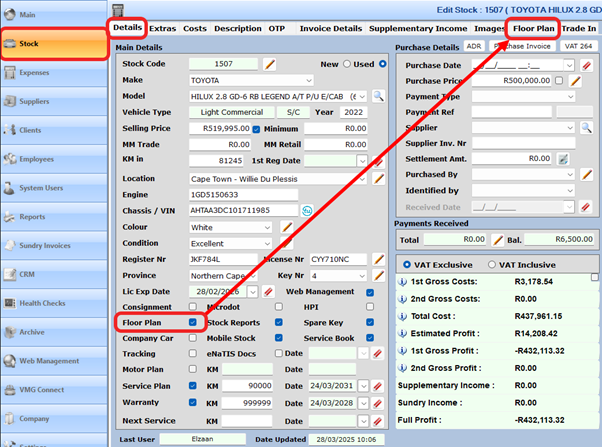
  • Open the relevant vehicle from the stock tab
  • Tick the floorplan tick box on the Details Tab and then select the Floorplan Tab
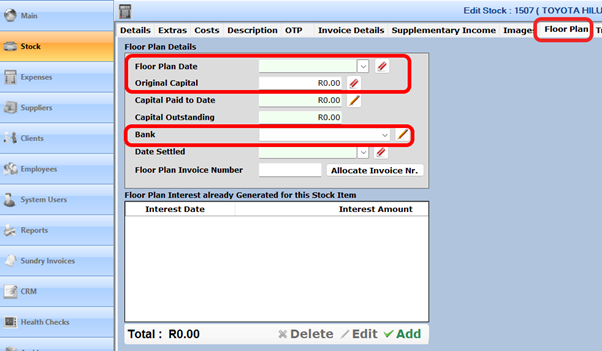
  • Once in the Floor Plan tab
    • Enter the date the vehicle was added to Floor Plan
    • Enter the original Capital borrowed
    • Select the relevant bank and ensure that the correct interest rate is being used

NOTE: If the interest rate changes, be sure to add the new interest rate and update all vehicles on Floor Plan to the new rate.
Printing The Floor Plan Invoice #

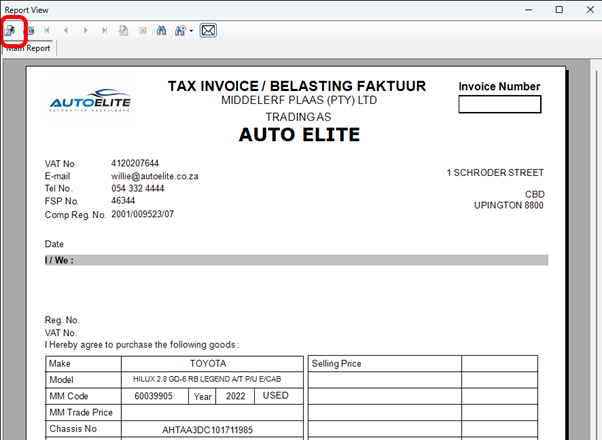
Some Floor Plan providers require that you send them an invoice.

NOTE: The Floor Plan invoice generated has ZERO effect on any other VMG reports. It is simply a document that can be printed and sent to your Floor Plan service provider.

  • Allocate the Floor Plan Invoice number
  • Print the Floor Plan Bank Invoice by selecting the Save & Print Floor Plan Bank Invoice button
  • Export the invoice to PDF and save it to a folder on your computer.
    • Once saved as a PDF, you can attach the invoice to an email.
Adding Floor Plan Interest and Admin Costs #

There are three methods you can use to manage this.

Method 1 #

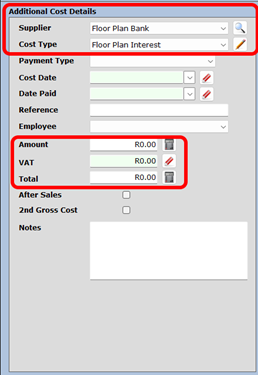
  • Manually add the interest and admin costs as seen on your statement provided to you from your Floor Plan service provider.
  • This method is advised for dealerships who have less than 20 vehicles on Floor Plan.
  • Using this method will enable you to capture the interest and admin fees directly from your SOURCE DOCUMENT (Bank Floor Plan Statement)
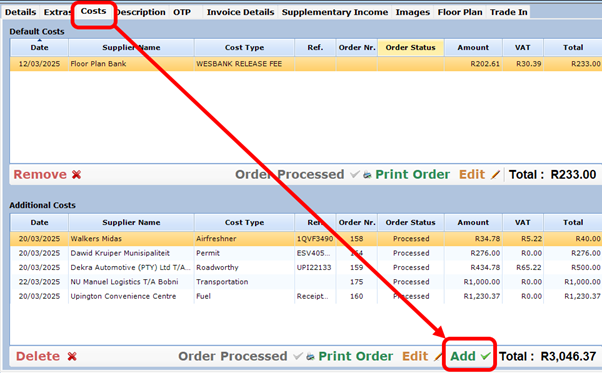
NOTE: Floor Plan interest is NOT vatable, but Floor Plan Admin fees ARE vatable.

Method 2 #

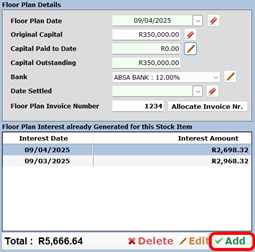
  • Add the interest amounts to the vehicle directly from the floorplan tab
  • This will add the interest cost to the costs of the vehicle.

NOTE: You will still need to manually add the admin fees as described in Method 1
Method 3 #

  • Use the Floor Plan Interest Generator once per month.
    • Add a calendar reminder to assist you in doing this on time every month.
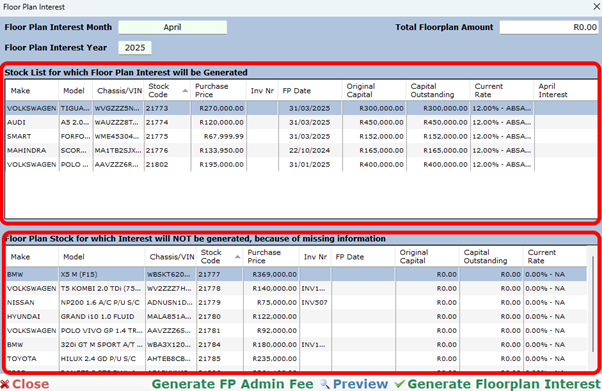
  • Click on the FPI button on your main stock screen.
  • You will be presented with two windows.
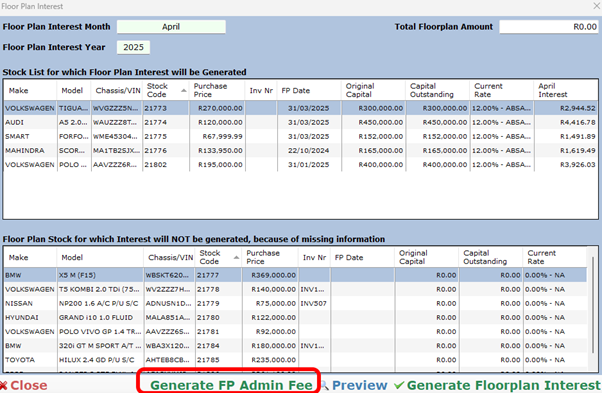
  • The top window displays vehicles for which interest can be generated, the bottom window displays vehicles with missing floor plan interest data. The bottom window should be empty.
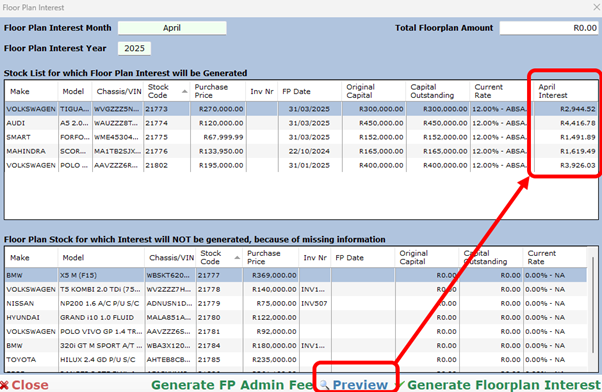
Select the preview button to view the interest rates amounts for the month so that you can compare the amounts to your Floor Plan statement for the same month.
Generate Floor Plan Interest #

This feature will add the interest amounts onto each car as a cost.

NOTE: Once you have generated the floorplan interest DO NOT close the floor plan window. Forst complete the Generate Floor Plan Admin Fee Set seen below

  • Click the Generate Floor Plan Interest Button

If presented with the following message, first correct your Floor Plan data. Alternatively, click yes to continue.

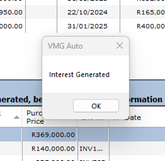
If successful, you will be presented with the following message
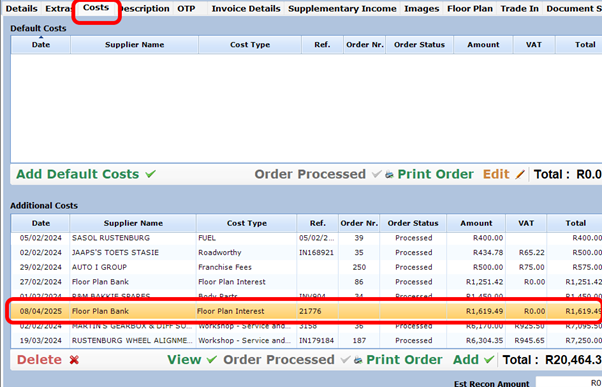
You can check this by opening any of the vehicles on floorplan to verify that the cost has been allocated correctly.
Generate FP Admin Fee #

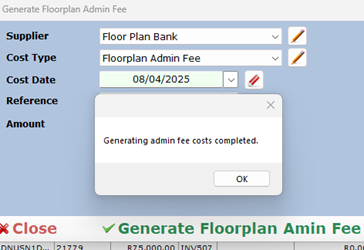
 This feature will add the Admin fee to each vehicle on floorplan for the month.
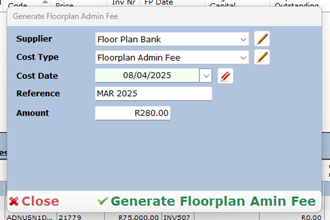
In the next step, assign the data to the fields presented to you and select the Generate Floor Plan Admin Fee button
After selecting Yes, you will be presented with the following message
Floor Plan Reports #

There are two categories of Floor Plan reports.

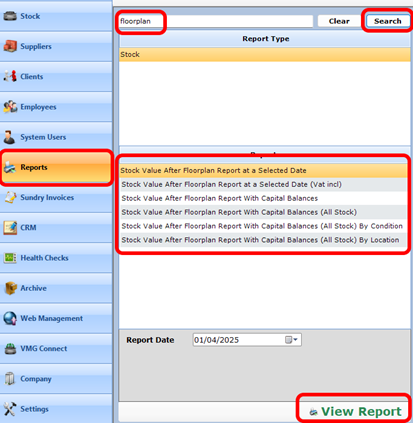
Stock Value with Floor Plan Reports #

  • Navigate to reports
  • To view the stock value reports, type floorplan with NO spaces in the search box and then click search
Financial Floor Plan Reports #

  • Navigate to reports
  • Type Floor Plan with a space between floor and plan.
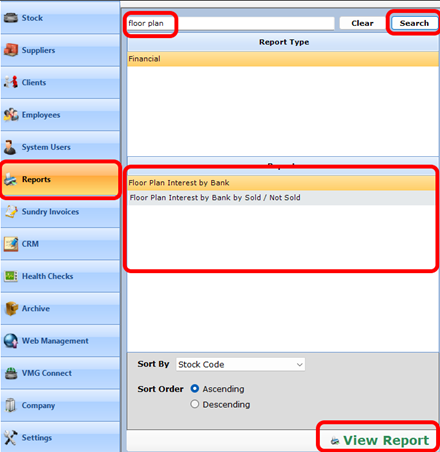
  • Select the report that is relevant for your needs.

Settling Floor Plan Vehicles and Removing them From Floor Plan #

  • Once vehicles are sold, the bank will be paid back the Floor Plan amount borrowed.
  • When this is done, we need to visit the Floor Plan tab for that specific vehicle and add the Capitol amount paid as well as the settlement date.
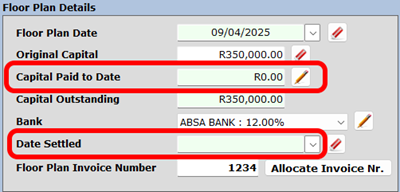
Once the vehicle has received a settlement date, it will be removed from the floor plan reports.

Updated on October 30, 2025
Table of Contents
  • Understanding the administration steps to Managing Floor Plan vehicles in VMG DMS
  • Adding Vehicles to Floor Plan
  • Printing The Floor Plan Invoice
  • Adding Floor Plan Interest and Admin Costs
    • Method 1
    • Method 2
    • Method 3
    • Generate Floor Plan Interest
    • Generate FP Admin Fee
  • Floor Plan Reports
    • Stock Value with Floor Plan Reports
    • Financial Floor Plan Reports
  • Settling Floor Plan Vehicles and Removing them From Floor Plan