Skip to content

VALUES VISION MISSION STRATEGY

4
  • Our Core Values
  • Our Core Strategy
  • Our Mission
  • Our Vission

ONBOARDING NEW CUSTOMERS

18
  • OS Onboarding Guide – New Dealership
  • OS Onboarding Guide – Migrating Existing Dealership
  • The Onboarding Process
  • Expectation Management
  • The Demo
  • Demo Notes – by Kendall Adams
  • Quality User Experience
  • The Quote
  • Quote Notes – by Kendall Adams
  • Quote Mistakes
  • The Take-On
  • The Welcome Email
  • Install and Setup WMS
  • Progress Reports
  • Status Update Emails
  • User Alert Emails
  • DMS Onboarding Checklist
  • WMS Onboarding Checklist

VMG ACCOUNTING

16
  • DMS Accounting Take On Rules
  • WMS Accounting Take On Rules
  • DMS with WMS Accounting Take On Rules
  • Opening Balances Process
  • Cost of Sale @ Point of Sale Process
  • VMG MULTIBRANCH
  • Accounting Fundamentals
  • What type of bookkeeping platform is VMG?
  • Suggested Paperwork Process Flow
  • VMG Bookkeeping Process Flow
  • The Onboarding Process
  • Quality User Experience
  • Accounting Assessment
  • Inventory Costing Methods
  • User Alert Emails
  • VMG Bookkeeping Services Agreement

VMG WORKSHOP PRO

13
  • Jobcard Workflow
  • Inventory Costing Methods
  • WMS Onboarding Checklist
  • User Alert Emails
  • DMS & WMS Mobile Assessment
  • WMS Pro Assessment
  • The Onboarding Process
  • Install and Setup WMS
  • WMS Product Knowledge Builder
  • Inventory Costing Methods
  • Mobile App Stock Take
  • JobCard Timer
  • In Progress: DMS & WMS Integration

VMG DMS PRO

10
  • DMS 101 Practical Assessment
  • Transunion Pricing 2026
  • Managing Over Allowance
  • DMS Pro Health Check
  • Floor Plan Management
  • The Onboarding Process
  • DMS Onboarding Checklist
  • User Alert Emails
  • DMS & WMS Mobile Assessment
  • DMS Pro Assessment

WORKING WITH OTHERS

7
  • People Are Who You Make Them
  • Relationships & Influence
  • Problem Solving Step by Step
  • Quality User Experience
  • Mastering Effective Communication
  • Professional Selling
  • Expectation Management

ASSESSMENT TOPICS AND QUESTIONS

20
  • WMS 101 Practical Assessment
  • DMS 101 Practical Assessment
  • VMG Accounting 101 Test
  • High Level Knowledge Assessment
  • Add-Ons Department Knowledge Assessment
  • Support Department Knowledge Assessment
  • Technical Knowledge Assessment
  • Domains And Emails Knowledge Assessment
  • Society Knowledge Assessment
  • Industry Knowledge Assessment
  • Training Knowledge Assessment
  • Sales Knowledge Assessment
  • WMS Pro Assessment
  • DMS Pro Assessment
  • Accounting Assessment
  • Onboarding New Customers Asessment
  • DMS & WMS Mobile Assessment
  • CRM Assessment
  • Management Knowledge Assessment
  • Business Knowledge Assessment

VMG HIGH-LEVEL

4
  • What is VMG Software?
  • VMG Departments
  • Data Security and Confidentiality Policy
  • The VMG Service Ethos

VMG ADD ONS DEPT

2
  • VMG Website Templates 2025
  • Quick Guide: AutoTrader Feed

VMG FRONTLINE

13
  • 2026 Pricing (VAT Incl)
  • Install and Setup WMS
  • Quality Site Visits
  • Welcome to the VMG Frontline Team
  • What is VMG Software?
  • The Frontline Job Description
  • The Frontline Duties and Responsabilities
  • Our Culture
  • Our Commitment to the Motor Industry and VMG
  • VMG Departments
  • Our Competitors
  • Our Market
  • The VMG Service Ethos

VMG SUPPORT DEPARTMENT

3
  • DMS Installation Protocol
  • Install and Setup WMS
  • The VMG Service Ethos

MANAGEMENT & LEADERSHIP

6
  • How to make new staff members feel part of VMG
  • The Leadership Trifecta
  • Leadership: Accountability without Micromanagement
  • Leadership: Accountability – How to Build It
  • Management Basics
  • Leadership Styles

BUSINESS KNOWLEDGE

4
  • Business Agreements
  • Governments Role In Business?
  • How Business are Setup in South Africa?
  • Why Do Businesses Exist?

THE CAR PLACE

2
  • Transunion Pricing 2026
  • Reseller Products Sign Up process

VMG ONLINE

3
  • OS Onboarding Guide – Migrating Existing Dealership
  • Creating 3rd Party Vendor API Keys
  • OS Onboarding Guide – New Dealership

PROFESSIONAL USER TRAINING

3
  • The Essential Training Delivery Module
  • What is Leaner Centricity
  • Training Phases – WMS

VMG CRM

2
  • Questions the Sales Manager Needs to Answer
  • CRM Assessment
View Categories

Quick Guide: AutoTrader Feed

3 min read

This guide outlines the critical differences and support procedures for the new AutoTrader (AT) feed. This process is fundamentally different from all other VMG feeds and requires a shift in how we manage customer expectations.

Key Difference: Direct API Submission #

All other VMG feeds send vehicle data to a VMG-controlled endpoint, which aggregators fetch. When a user clicks Update Web in VMG Webmaster, the endpoint updates in real-time, and we can see that data.

  • The AutoTrader feed is different. We submit vehicle data directly into their API.
  • The Challenge: The moment data leaves VMG Webmaster, we lose visibility and control. We cannot see what happens to the data within the AT system.
Support Challenge & Expectation Management #

Customers will contact us about issues that are outside of our control. Frontline support must be aware of these issues and MANAGE USER EXPECTATIONS accordingly.

If a vehicle is “on Web” in VMG Webmaster but not on AutoTrader, the issue is almost certainly on their side.

  • Timeframes: All issues below require DREAN to contact AutoTrader for resolution. We cannot promise any timeframes for how long an issue will take to resolve.
Required: User Training & Preparation #

The most effective way to minimize AutoTrader issues is to ensure customers are properly trained to use VMG Webmaster. We expect support to reinforce training on perfectly preparing vehicles for the web.

Inefficient Scenario (Must be avoided):

  1. Customer calls support because a vehicle isn’t showing.
  2. Support spends unnecessary time troubleshooting.
  3. We discover it’s an AT rejection issue (see below).
  4. DREAN has to contact Frontline/User to fix, resulting in re-uploading time.
The Cause: AutoTrader Moderation (Rejection Triggers) #

AutoTrader has a team that manually or automatically checks every uploaded car. A car will be put into MODERATION (meaning not displayed on AutoTrader) if it triggers any of the following issues:

note: VMG Webmaster currently shows these vehicles as “on web”.

Vehicle Data Issues #
  • Incorrect VIN.
  • Duplicate VIN: The VIN is already loaded in the AT database by another dealer. AT will not display the same car twice.
Image Content Issues #
  • Not Enough Images are loaded (AT minimum required).
  • “Coming Soon” Images are prohibited.
  • Generic/Stock Images: Using a picture from the internet (e.g., a new model’s image for a used vehicle).
  • Images containing:
    • Company Logo
    • Contact Info (e.g., telephone or email addresses)
    • Warranty Info

Action: If a user reports a missing vehicle, first check if any of these conditions are met, especially the image content. If they are, have the user correct the vehicle immediately.

Prepping Vehicles for Autotrader Feed #

Step 1

  • Select the stock item you want to prep for web
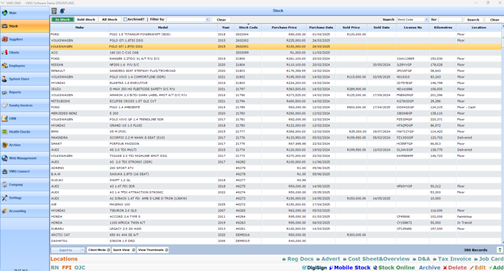
Step 2

  • Ensure that vehicle data is accurate to avoid an unpleasant experience later in the webmaster process.

NB!!! Ensure that vehicle data is accurate to avoid an unpleasant experience later in the webmaster process.

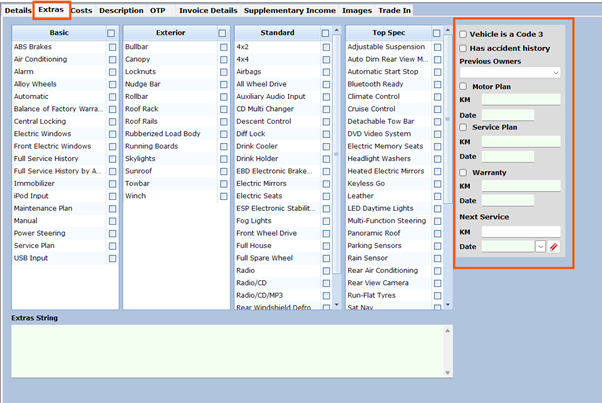
Step 3

  • Add vehicle extras
  • Add the vehicle extras
  • Add service history
  • Add previous owners

You will see motorplan, service plan, and warranty, as well as the next service is also there to be updated if the vehicle still has them.

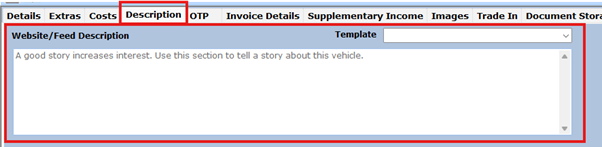
Step 4

  • Add a description that will be displayed on the Autotrader website.
Step 5

  • Add images
  • DO NOT UPLOAD
    • Coming soon
    • Generic pictures
    • Company logo
    • Contact Info
    • Warranty Info

Congratulations your vehicle is now prepared to be uploaded. Our team will send the Upload Guide when vehicles are prepped.

Step 6

Navigate to Webmaster to upload to Auto Trader

Updated on March 11, 2026
Table of Contents
  • Key Difference: Direct API Submission
  • Support Challenge & Expectation Management
  • Required: User Training & Preparation
  • The Cause: AutoTrader Moderation (Rejection Triggers)
    • Vehicle Data Issues
    • Image Content Issues
  • Prepping Vehicles for Autotrader Feed