
Evolving towards perfection and scalability #
Last updated – 26/01/2026 by Alan
Welcome to the VMG DMS Online team. Serving on this team means that you are now a part of Motor Trade history. What we are embarking on with this product, has never been done before in this way. It is open of the most exciting chapters in the 20-year history that VMG has been of service to the Motor Trade.
If you are reading this, then chances are that you desire to be a part of something epic. Chances are you accept the responsibility to help ensure that the role out, of DMS Online is managed with grace, deep care for the end user, humility, professionalism and precision. It is imperative that you apply great judgment, pay the closest attention to every detail, no matter how big or small and that you ensure that yours and VMG reputation is glowing in the most positive manner possible.
Our outstandingly positive reputation is achieved through excellence in frequent communication to the end users and relevant role players.
The DMS Online journey, has a long history. The version you are working with is the latest product our development team has provided to us. It has cost VMG millions of rands to produce and as with most things at VMG, we are just getting started. Onwards and upwards we go.
As with any new software platform, the team responsible for rolling it out to the market, needs to stay alert to any opportunities for improvement. We have tested and tested and yet, experience has shown us that an end user is able to expose bugs and errors in any code base. It is our desire to hunt these “bugs” down and rectify them expediently so that our end users can enjoy a most positive experience using our software.
The information below seeks to inform you about the process that we have developed to ensure the successful onboarding of your DMS Online customers and users.
Thank you for being a part of this journey with us. Together we are creating something greater than the sum of all it’s parts and we salute you for joining us on our Motor Trade adventure.
The Process #
- Demo Provided
- This product is only available for DMS Lite customers.
- Reach out to as many potential customers as you can. The market is huge and is waiting for you.
- The standard demo, info gathering and sales process applies.
- Make sure you only send quotes to customers who meet the following criteria
- All users are happy to use google chrome
- All users have a mouse with a scroll wheel
- Invest the time to meet each user after the demo
- Explain to them that their boss is considering investing in software to help them make their day-to-day admin loads and access to information easier and more streamlined.
- The “vibe” coming from you must be the same “vibe” you have when you are telling a friend about something you think is “the coolest thing ever!”
- Take note of their psychological state
- Does your gut instinct tell you that they are in the Rejection / Acceptance / Assimilation state of being.
- Use this opportunity to help nudge them closer to the acceptance or assimilation state.
- Remember that people fear a loss of certainty and control. Give these two things to each user through smart use of words and body language.
- People need to feel important. Give this to them.
- Check their PC for mouse scroll, google chrome, tidiness, strange programs installed
- Check their desk. It will tell you what sort of person they are and help you know your audience better.
- The Standard VMG Quote (All VAT Incl)
- The upfront fee starts at R 5 500.00
- The DMS Lite monthly amount is R 2 255.00 (see Current Pricing)
- The monthly fee increases by the CPI % each year.
- Feeds are R 260.00
- Take On Form received
- Accounts dept adds client to Legacy Automan
- Accounts dept send the Setup and Training invoice
- Client pays the Invoice
- Database Created
- Company is created using Automan Online

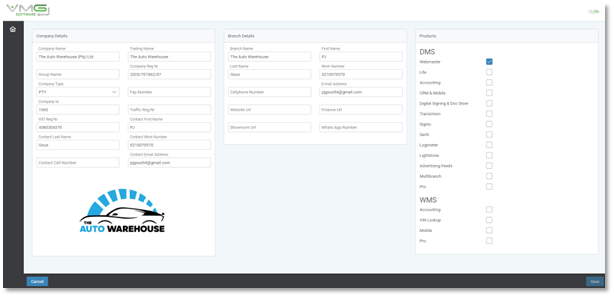
- Once company is created, we log onto the client database on VMG Online

- We make sure their logo is added to both company and branch and that the company and branch information is correct.

- We setup User Levels

- Welcome Email sent and must include the following
- It must warmly welcome all primary and auxiliary role players
- It must inform users as to what has been achieved and what to expect next
- Database created and ready for users
- Company and branch details have been added
- Company logo has been added
- It must inform the user what documents they will need to have on hand for training to commence.
- 3 x Deal Files
- Costs on vehicles
- It must stipulate clear training time frames and dates for each user
- It must inform users about support availability and process required to submit errors and user requests.
- It must convey a sense of excitement, happiness, professionalism and goodwill.
- It is used to help you, sometimes through peer pressure, to bring all users into the acceptance or assimilation state of being.
- NEVER attempt to train a user who is in the rejection state of mind.
- Training Phase 1 – Primary Administrator and Invoice Clerk
- Objective is to ensure that after Phase 1 is complete, users will be able to use their VMG as their primary invoicing tool
- ALL other invoicing tools must be deprecated with immediate effect. This is mandatory. Users tend to slip into their comfort zones. Your task is to ensure that VMG is the new comfort zone.
- Your user MUST have the last 3 deal files available to commence with the training.
- Security Discussion – 5 Min
- The user must be made aware that his username and password must be kept secret the same way they do with their internet banking
- It is advised that the password manager IS NOT used.
- The system will lock the user out after a period of 5 minutes of inactivity
- Once locked out the user must re-enter their password to be able to continue their work.
- System Overview and Setup – 20 Min
- We use this to give a quick tour of all the main components of the system.
- Employees & System Users
- We add employees and system users in the same section.
- Once the employee info is filled out correctly, the “system user” button will appear.
- We add the user password and user level and save.
- PLEASE RECORD THE USER PASSWORD INTO AUTOMAN WHENEVER POSSIBLE
- The user must open their email client and verify their email before they can logon.

- Once the user has logged on, we shake their hand and provide them with an official welcome and smile. It’s a great moment. Build excitement.
- Once the user verifies their email address, they will be taken to the logon screen where they will user their logon credentials to access VMG.
- Adding Vehicles
- User is shown how to add vehicles into VMG
- They also learn how to add suppliers.
- You will add the first car and describe your process and the screen as you progress.
- Note: Days in stock uses the received date and not the purchase date
- Stock codes are manually added for the time being.
- Once all the stock on hand is added, we will set the stock sequence to run from that moment.
- The stock reports are reviewed with the user.
- Adding Costs
- User is shown how to add / edit / remove costs on vehicles.
- User is shown how to add default costs.
- OTP and Invoicing Vehicles
- The last 3 deal files should have an invoice number sequence.
- Set the invoice number sequence starting with the lowest number displayed in the deal files.
- Invoicing clerk is trained to complete an OTP and print their required documents
- OTP data is transferred to invoice
- Invoice is printed
- User is welcome to bring previously sold cars into the system but for those vehicles they MUST NOT allocate invoice numbers.
- Once all previously sold vehicles have had their sold details completed, user must send us a spreadsheet showing stock code and the corresponding invoice number. VMG will assign the correct invoice numbers to those vehicles.
- The sales reports are reviewed with the user
- The full profit report is printed and taken to the owner to show him the results of the training.
- Training is complete when the owner approvers the full profit report.
- Progress Report
- Must be sent within a single business day once training is provided.
- Must describe what has been achieved and congratulate the users
- Users must know which other users they can turn to get something done in system
- It must clearly stipulate what objectives need to be achieved to move onto phase 2
- Remember SMART goal setting
- Training Phase 2 – Reports
- We go through the various reports with the users and owner
- Do we have ALL stock on hand (incl consignment) loaded into VMG?
- Are the purchases prices and costs, correct?
- Are the sales and profit reports accurate?
- We go through the various reports with the users and owner
- Progress Report
- Must describe what has been achieved and congratulate the users
- Users must know which other users they can turn to get something done in system
- It must clearly stipulate what objectives need to be achieved.
- Remember SMART goal setting
- It closes off the training and hands over to support
- Commissions can be claimed.
Regular database reviews must be conducted in the first few weeks to make sure that users are progressing at a satisfactory level.
Commission clawbacks for software not being used may be applied.