
Notes for the best Trainers #
Introduction #
Welcome to the VMG Training team! As a trainer, you play a vital role in shaping our users’ experience. This guide will equip you with the knowledge and skills to create a positive and impactful learning environment, ensuring our users get the most out of our software and services.
At VMG, we recognize the importance of a quality user experience. Without satisfied users, our software has no value. Your role as a trainer is crucial in empowering users to confidently navigate our products and achieve their goals.
Every interaction you have with a user contributes to their overall experience. From the initial training session to ongoing support, you are an ambassador for VMG, instilling confidence and building lasting relationships.
This guide will explore key principles and best practices for delivering exceptional training and fostering a positive user experience. We’ll delve into topics such as communication, expectation management, product knowledge, and professional development.
Our Altitude IS Determined by our Attitude
A positive, “can do” attitude, combined with a deep understanding of your purpose and objectives and a true commitment to honouring your purpose even in the face of the greatest adversities are corner stone qualities of an effective trainer.
There are countless books about self-management and self-awareness. We suggest you read as many as you can. If your thoughts are not properly aligned and managed, you will find an ever-increasing set of obstacles and challenges to overcome.
For many these challenges become overwhelming and a sense of foreboding, failure and despair creep into the fabric of your life which can only be overcome through a positive and deliberate change in the way you think of yourself and the world around you.
Your thoughts dictate your experience of the world. A positive and realistic mind set and self-awareness and “aweh-ness”, are required tools in the toolbox used to build a successful life.
Indicators of Success
Over time, we can measure the success of our user experience efforts. Some primary success indicators include:
- Minimal Support Calls: Ideally, support phones should only ring for installations and remote connection setup. If users are frequently calling for help, it indicates a potential failure in training, software functionality, or both.
- Positive Feedback: Users who are happy with their experience are more likely to provide positive feedback, referrals, and testimonials.
- High Software Adoption: Users who find the software valuable and easy to use will continue to use it and integrate it into their daily workflows.
- Happy Customers: Satisfied customers are more likely to renew their subscriptions and recommend VMG to others.
By mastering the skills and knowledge in this guide, you’ll contribute directly to these success indicators and play a key role in VMG’s continued growth. Let’s work together to empower our users and build a thriving community around our products.
Successful Communication #
How do you know that you have communicated effectively? The answer is far more simple and easy to apply that one might think.
Communication has been successful when the recipient has acknowledged the senders message and the sender acknowledges the recipients acknowledgment. Simple as that.
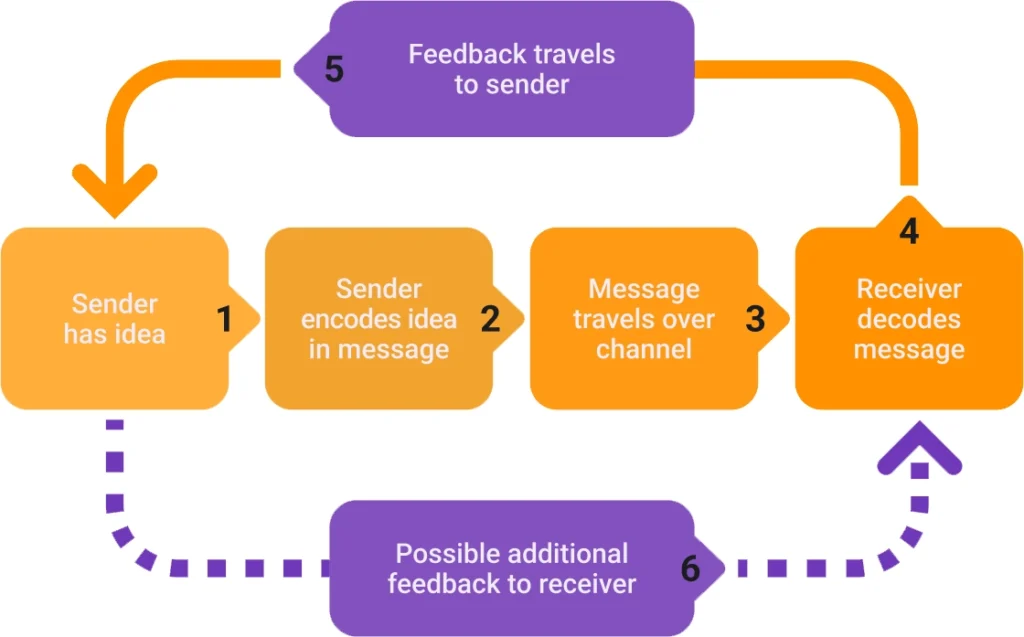
Don’t mistake successful communication with understanding. Just because you have communicated effectively does not mean that the recipient has understood what the sender has communicated.
Clarifying understanding is the only way to know if you have communicated successfully.
Different User Types #
You will be working with abundance of different users. They will come from different backgrounds, cultures, family units, life philosophies, intelligence levels, experience and general knowledge. You need to be a “chameleon” and bring yourself down or raise yourself up to your users’ level as required.
No one is like you, and you need to be sure that you don’t assume that just because you know something that others will know that too. This is a common mistake. What is obvious to you is seldom obvious to others.
Users require intelligent finesse on your part. Be sure to get a sense of your user’s level of competence and knowledge before you start training them so that you can give your user the best chance of understanding your training requirements.
Let’s have a look at some of the types of users you may encounter.
The Old Hand
Aunty Lucy is 70 years old, usually associated to the one in some way to the owner (Mom/Aunt, In-Law etc). Aunty Lucy used to be the PA to the chairman of big corporate. She’s seen a lot and is the sweetest person you will ever meet and just wants to be a part of something because the few years she sat at home knitting with her cat didn’t fulfil her. She wants to feel needed. She wears her thin rimmed glasses on the tip of her nose and types with two fingers and looks at the screen every few seconds.
She needs assurance that in a short time frame she will be training you. She needs patience.
The Before Computers User
Owen is BC (“before computers”). He has been in the motor trade for over 30 years and thinks admin is important but wants nothing to do with it. Owen is typically extremely overweight, has very thick fingers and is suffering from some or other health issue related to excessive brandy and lamb chop fat consumption.
Don’t be fooled, even though Owen types with one finger and looks at the screen, and then moves his mouse with the same hand he types with and then clicks in the field and then types again with one finger and so on, Owen is a hyper intelligent human being. I am not talking book smarts because Owen may only have a Std 8 certificate, but Owen is able to present a stock holding of over R10 million that he grew from one Volkswagen Beetle 30 years ago. Consider how many cars you own and then look at Owen and all his investments and wealth with his Std 8 certificate. It’s important to keep perspective and to realize how incredible it is that men like Owen are the reason our Motor Trade thrives.
The My Time is More Important than Yours User
Niyaaz goes to Mosque every Friday and loves to be on the cutting edge of technology. Niyaaz is a risk taker and doesn’t care to be involved in the day to day running of the business but rather just wants to buy cars and take great care of his family. Niyaaz is a family man in every way and getting him to sit down for 5 minutes to look at a computer screen is near impossible. Rather Niyaaz will contact you when he needs something, and he relies on you to make sure his staff are up to speed on what needs to be done with his admin.
The Noob
This user has never worked before and is amongst the most challenging users to work with. You will need to be very patient with her and very specific in the objectives that need to be achieved. This young lady is prone to be distracted by her phone every 5 seconds and so your training needs to be vibrant and split into small task driven exercises that are easy to accomplish and understand. Over time, she will become your best user because she was not tarnished with any other admin brushes in the past. She’s your canvass.
Chartered Accountant
This user can be your greatest ally or a massive pain in your life. Understanding their background/history and working closely with them will go a long way to making your relations a very positive one. Chartered accountants know everything about everything and are generally very set in their ways. You are best set for success with this user by sticking to the basics. If you can show a chartered accountant the T-Accounts process flow and be upfront about the fact that we are a COS at POI and not POS based system, you will have a great time.
Owner that has run multi-million-rand business in the past and sold to keep himself busy selling cars
These users can absorb a tremendous amount of your time. They are often ignorant of many aspects of the motor trade and end up relying on you to explain to them how the business works. Help them as best you can but always remember that we have many hundreds of dealership owners to serve. Beware of investing 80% of your time into only one or two clients.
Sales guys opening their own businesses
These are sometimes the best clients to have. A salesperson starts selling so many cars for his “boss” that he decides that with an investor or using his own funds he can make it on his own. We salute these brave souls. A salesperson that has become accustomed to using VMG that starts his on dealership and then realises the importance of quality administration is a customer that is open and willing to help guide the process with his/her team. It is a great compliment to you and to VMG that they call us first to make sure the admin is taken care of.
The Know-It-All User
This user often tells you how you should be running your company and how you should be developing your software. They often deliver complex network infrastructure that we need to work within. Try your best to acknowledge everything this user has to say and be sure to always stick to the basics.
User Psychology #
Understanding the general human condition will go a long way to helping to get the most from your users.
When meeting people for the first time and requiring them to do something new that they did not choose themselves, it is common to face resistance. Remember that humans are not afraid of change. They are afraid of loss. Loss of power, loss of status and loss of certainty.
By migrating from their comfort zone system they have been using for years, to move over to a new system (VMG), these fears will be manifest. You will be required to put these fears to rest well before any training times are setup. Get them to look forward to the change by discussing their current gripes with the old system and how VMG will make their days better. Get them to think that the change to VMG is their idea.
Understand that through quality communication, goodwill and a professional demeanour, you will be able to move through the following items far quicker than you can without using the best of your sales tools.
The User Comfort Zone Journey
Generally, when you meet users for the first time, many of them will be unconsciously resistant to any changes that might result in working with you. People fear change or rather, they fear leaving their current comfort zone. Understanding this and how to overcome it, are critical skills which you must pay attention to and understand where each user is at during this life cycle.
The life cycle can be split into the following phases
Total Resistance –> Partial Resistance –> Acceptance –> Partial Assimilation –> Total Assimilation
You are required to get your users to in the shortest time frame possible. The longer it takes you, the more time you will need to invest. Your time is valuable, invest it wisely.
- Total resistance can be identified by the user always being too busy to book a training session with you, not attending training times pre arranged. It demands that you use your sales skills to help change the users’ state of mind so you can move them into partial resistance. On occasion you will need to recruit the help of senior management as well as users already in the Total Assimilation phase.
- Partial resistance is usually indicated by the willingness of your user to spend time going through the system with you but is still focused on any distraction that presents itself.
- Acceptance is usually indicated when the user is focused on the training you are giving them and have met their objectives required from you (e.g. they have deal files ready or have customers they can add).
- Partial assimilation is identified when the user is beginning to ask questions. Any questions related to making data input progress is a great sign.
- Total assimilation is identified when the user is doing their best to take over the mouse and wants to “do it themselves”. Where this is present, let them do so.
Remember that users can only learn by doing. Let them do it. Watch them do it and then sing their praises from the roof tops when they do it right and quietly guide them when they do it wrong.
16 Methods to Move Past Comfort Zones #
Visualize The Other Side:
When clients are resistant to a challenge, one tactic I find helpful is to provide them a space to describe the moment on the other side of completing the challenge. No matter how hard the challenge is, knowing the joy that lies on the other side of it can help a person push through.
Cultivate Curiosity:
Cultivating curiosity is a great way to help clients step outside their comfort zone by creating an enabling environment for learning and growth. When you are constantly curious, learning simply becomes part of your repertoire, you are hungry to learn and improve, to know and do more. You are more likely to read, reflect, experiment, find a mentor, engage a coach, seek feedback, etc.
Tell Relevant Client Stories:
I have told client stories so often I often forget that I could call it a coaching tactic. But it works. For some of my clients who need a breakthrough, they need to hear the problem and actions we took previously. I may even introduce new clients to previous ones to reinforce these stories more viscerally. No one tactic works, but knowing someone like them faced their fears and overcame them helps.
Ask Powerful, Motivating Questions:
It’s a misconception that organizations expect consultants to have all the answers. As a VMG trainer, your job is to make your client find answers augmented by your solutions. Instead of directly pushing your clients out of their comfort zones, ask them powerful questions. Example: When was the last time you thought about this? What was the need? What made you think that way? How did you act on it?
Coax Them Past Their ‘Learning Edge’:
Begin with thought-experiments or self-observation, which produce new awareness with no change in behaviour. The client does what they normally do, except now they do it awake and noticing what triggered it and what’s encouraging change or resistance. By studying “what is,” the client is already moving toward “what could be” with less risk of repeating the same old unproductive behaviours.
Help Them Take Small, Significant Steps:
Tackling big changes can be overwhelming and demoralizing. When creating action items, keep them specific, small and significant. The process of change is more like a stairway than a rocket launch. It’s important for them to see some results quickly. This motivates them for further adjustments outside of their comfort zone and encourages them to see change as a gift—not a burden.
Be Measurable:
The best way to get a client to see why it may be necessary to move outside their comfort zone is to keep in front of them measurable ways their business will grow. Ask them quantitative questions that help to raise their levels of awareness in the situation and show them how small steps outside their comfort zone can lead to big impacts that compound over time.
Be An Authentic Role Model:
Discover what your clients’ needs are and help them meet these needs. Clients will perform effectively and optimally if they see achievable results. With satisfaction, your clients’ behaviours will change and will voluntarily respond to your encouragement if they see you as an authentic role model.
Have Them Ask, ‘What’s The Worst That Can Happen?’:
As a client is moved beyond their past behaviour, ask both them and you, “what’s the worst that can happen,” and discuss that. We all need to be cognizant of consequences—them for confidence, and you as a responsibility. Never ask a client to take a risk with seriously negative outcomes as a possibility; you’ll lose their trust.
Get Them Dancing on the Edge of The Zone:
Fear, uncertainty, and vulnerability usually fuel hesitancy to step out of one’s comfort zone. Work with clients to visualize three scenarios: staying status quo, living with a solution on the edge of their comfort zone and adopting a solution far outside of their comfort zone. Talk through the pros and cons of each. It is likely that they will at least embrace dancing on the edge of their zone.
Build Rapport Before the Nudge:
The key will always be to build rapport first. Once the “bond” is made, there are very few things that will be unheard. We must remember that working with clients is about authentically wanting to help. Transparency is key, and when our intentions to help our clients are true, then a little nudging and encouraging will always be taken well. The strategy will always be to help.
Look Back to Move Forward:
Ask your client to reflect on other challenges and/or questions that seemed daunting at the time. Identify one or two things they thought were out of reach. How did they approach the problem? What steps did they take that enabled success? Reminding your client of past successes can be empowering. If they’ve tackled problems in the past, access that same creativity and grit to move forward now.
Validate Them First:
It is the opposite of what we might think. We need to point out people’s areas for growth in order to help them stretch. But if we do that too much, they lose confidence. They also lose trust in the messenger because trusting requires feeling trusted. So, instead, validate first: Focus on the merits of their existing intentions or approach, and build from that. They will be more open and willing.
Remind Them of What They’ve Accomplished:
The two greatest fears that keep people locked into their comfort zones are a fear of the unknown and a fear of failure. It’s the dreaded “what if it all goes wrong?” question that prevents forward movement. However, I can help my client remember a time when they faced these fears and achieved success on the other side, reminding them that they’re stronger and more capable than they know.
Talk Through Their Past Actions, Feelings and Outcomes:
We have all stepped outside our comfort zone at some point. I ask my clients to recall previous times they stepped outside of their comfort zone—a great tactic, as it reinforces that this has been done before and can be replicated. Talking through the actions they took previously, as well as the feelings and outcomes they resulted in, has an empowering impact.
Trust The Process:
It sounds counterintuitive but letting audacious goals go and concentrating on daily actions is the best help. Whenever my clients focus too much on results (e.g. dream job, numbers on scales) they feel afraid of leaving their comfort zones. If they do daily tasks (45 minutes of job hunting, mastering their resume, 30 minutes of walking, etc.), they don’t notice that they are far in a growth zone.
Fastest Route to a Positive User Experience #
Choose your Customers
The easiest way to ensure a positive user experience is to ensure that you have picked the right client. This section assumes that this has been achieved. If you are not sure what the perfect client profile is, please chat to your regional manager for guidance.
We have the privilege and duty to ensure we can serve our clients well. We MUST choose the right clients for our own sanity and theirs.
Make sure the environment is setup correctly
Nothing destroys a positive user experience faster than a poor infrastructure (network and hardware) setup. If the infrastructure is not conducive to “getting the job done” then “DO NOT accept the customer yet.
After your demo to a potential customer, ask the owner if you can take a quick walk through his offices to get a sense of the IT setup. This gives you a chance to see each workstation, assess their viability for VMG installation, meet each user, introduce yourself, get their contact details and their specific role (write it down – don’t think you can store it all in your head) and explain who you are and what might be happening. That way, should the quote be approved and the sale concluded, when they get the welcome email from you they are already “in the know”. People love to be in the know.
The Welcome Message
This is usually sent in the form of an email. Its intention is to welcome all the users and inform them of what they can expect in the coming days and weeks. We use this email to build anticipation and “hype”.
When you inform users of future events, you put the user in a position of perceived control. People love to feel in control. When we surprise them with new tasks and new ways of doing things we strip them of any sense of control and their natural response is to rebel.
The welcome message mitigates any risk in this regard.
Send Regular and Detailed Progress Reports
Of all the User Expectation tools in our possession, the Progress Report is amongst the most valuable and should be treated as such and used deliberately. In the right hands, its power can never be over stated.
The progress report helps you achieve the following objectives.
- It keeps a documented task list of Objectives the client, you, their business and each individual user still needs to achieve. It is our activity map for the road ahead.
- It give us goals to aim for.
- It highlights objectives/goals we have achieved. When people see progress they tend to progress even quicker and with greater vigour. It brings resistant users towards assimilation much faster.
- It keeps all stake holders informed as to the current state of progress and obstacles that are being overcome.
- It gives us a golden opportunity to publicly praise individual user’s efforts and results.
- It gives us the opportunity to thank the clients for their hospitality, attention, time and kindness.
“Of all the human desires that exist, the desire to feel important is the greatest of them all” – Dale Carnegie, How to Win Friends and Influence People.
Know When it is Over
It is important for users to know when training is over, and the support role begins. They need to know what to do now that training is complete and how to achieve any result they desire.
They need to be informed of what they need to have in place in order to get great support. TEACH YOUR USERS HOW TO USE VMG SUPPORT.
They need to know who to call for a specific problem. They can’t be calling you because you will be onsite with other people and cannot take phone calls.
We can only harm the user experience if the user incorrectly assumes they can contact us because their internet/network is down or if they have no electricity.
They need to know that they cannot reach us during the day because we are almost always on the road, in demo’s and training and meetings.
We are responsible for many of their assumptions. The more assumptions we can put into facts, the better we are managing the users experience of our people, products and services.
A user should expect that they can call us because they need VMG installed, VMG is giving an error or if they need to work remotely. A user contacting us for any other reason is generally a failure of some sort on our part as frontline.
Seek Opportunities #
Great trainers are able to identify exactly how to best help their users. On occasion, this might require the use of an additional VMG product or service.
Trainers have the closest shoulder to shoulder relationship with users. If we find that a user is duplicating data and that there is a product available that can help them, we have a duty to get the owner to implement that solution.
The goal of any good trainer is to monitor users and seek opportunities to guide and help them.
- You are always selling. If you think you are not a salesperson, you are wrong. You are in the people business and sales skills apply to you as much as they do to others whose job it is to bring in sales. Our role is to ensure happy users
- If people like and trust you, they will buy from you. To get people to like, use their first name a lot, and get them speaking about themselves.
General Communication Tips #
Anyone in the people business will need to have a clear understanding of communication strategy and tactics. Below are some basic points to consider.
- Keep the same email stream for all your user journey emails.
- If you send progress reports, then send the next progress report as a “reply all” from the last one you sent.
- You only start a new email when the conversation is no longer about that specific thing for all role players. Let’s assume that your first progress report went to 10 people. If one user replies to your progress report and cc’s one other person then a new email stream involving 3 people takes effect. You now have two email streams. The first is the sent email to 10 users. The next time you communicate progress reports you will send the last email sent to all 10 users to the same 10 users. But the conversation between the 3 users will use the email stream that is between the 3 of you.
- DO NOT send a new email stream each time. Keep the conversation history in your email streams wherever possible.
- Realize that once your message is sent, it’s difficult to recall. Before sending an email, ALWAYS re-read your message and double check for grammar and misused words.
- Copy back salient points when replying to an earlier message.
- Use specific subject line descriptions in emails.
- Avoid sh-cuts and abbr. in biz email msgs (aka – avoid shortcuts and abbreviations in business email messages).
- Don’t Forward Viral Messages.
- Never send an email when you are angry. This is a difficult discipline to master for many people.
- Make communication a priority. Take classes, read books, magazine articles or learn from successful communicators around you. Seek a mentor or coach.
- Simplify and stay on message. Use simple, straightforward language.
- Engage your listeners or readers. Draw your listeners and readers into the conversation. Ask questions and invite opinions. Solicit their feedback.
- Take time to respond. After you’ve listened (and understood) take time to “draft” in your head what you want to say.
- Make sure you are understood. Don’t blame the other person for not understanding. Instead, look for ways to clarify or rephrase what you are trying to say so it can be understood.
- Develop your listening skills, too. The best communicators are almost always the best listeners. Listen without judgment and don’t be distracted by thinking about what you want to say next. Then, respond, not react.
- Body language is important. Studies show that 65% of all communication is non-verbal. Watch for visual signs that your listener understands, agrees or disagrees with your message. And be aware that your body is sending signals, too.
- Maintain eye contact. Whether speaking to a crowd or one-on-one, maintaining eye contact builds credibility and demonstrates you care about your listeners.
- Respect your audience. Recognize your message is not just about you or what you want. You should sincerely care about the needs and the unique perspectives of those to whom you are communicating. One of the best ways to show your respect is simply by paying attention to what they say.
Know Your Audience #
It is of vital importance that you have a good sense of the person you are training. You job often requires you to adapt to your audience and this can only be achieved if you have a sense of who they are and the level they are currently operating from.
Another advantage of knowing your audience is related to our likability and their trust in you. When you can get your audience to speak about themselves and tell you information that they do not generally divulge to strangers, they will inevitably like and trust you.
- How long have they worked there?
- How well do they know the motor trade? You need to establish their level of industry competence. A young person fresh out of high school needs to be cared for differently to a veteran of the industry.
- What do they think of technology? Are they a BC (Before Computers) person or do they have “Tach Savvy”?
- Are they happy with the way the business run?
- Have they ever worked with a product like yours before?
- How did they get involved in the business they are working in?
- Do they have a big family?
- Do they have children? (This helps you understand if they fetch the kids every day and helps you avoid booking appointments during that time)
- Do they celebrate holidays?
- What is their religion? (If Muslim, don’t shake women’s hands if you’re male, and remember to wish them Eid/Ramadan Mubarak etc…)
Your goal is to have a clear idea on who you are sitting with. There are many questions that you can ask your user to get a sense of who they are.
Remember what information your user gives you and use it to both of your advantages.
Be sure to adapt your training style to suit your audience and never assume that your audience understands what you are telling them. Always be sure to keep them close to you each step of the way.
Top Training Tips #
Always develop clearly defined goals
- Your user needs to know what outcomes are being desired before they begin.
- If your user is not on the same journey as you, if they do not understand the boundaries and milestones, you are guaranteed to be forced to duplicate all your training and user management efforts.
- This is not efficient, and you are not giving your user a quality experience.
Train with real world data. Never use test data
- Do not commence training until the user has real world data that they must process.
- This is data that the user would had to have processed in their “old” system anyway.
- The only difference is that they are now processing it in the new system.
- Failure in this regard is guaranteed to result in you having to provide the same training over and over again until you have real data the user can process.
- Do not waste your time trying to training with any other data.
Before you start training, remember the three “tells” and a check.
- Tell them what you are going to tell them
- Tell them
- Then tell them what you’ve just told them
- The check to see if they can do what you just told them
Dealership Admin Training Tips
- Do not commence training until the system has been perfectly setup. Have you ensured that the system setup checklist is 100% complete.
- Use the deal files for the last 3 – 5 sold cars in their dealership.
- Try to ensure that these sold cars also are the last invoice numbers in the invoice number sequence in their dealership. If not discuss the possibility of starting a new invoice number sequence. For some dealerships this is not important.
- Where applicable, set the invoice number sequence to the third last deal file invoice number so that you can allocate invoice numbers to these sold cars in the same sequence and that when the final deal file has been processed, your dealers old invoice number sequence and their VMG invoice number sequence match.
- Take the first deal file and bring the vehicle into stock, load costs, invoice the vehicle and add supplementary income if applicable. Describe the process to your user as they watch you process the deal file data.
- Next swap seats with your user and let them drive. Get them to process the second deal file whilst you point them where to click and share any other relevant information.
- Have your user process the 3rd deal file whilst you watch but DO NOT help them unless they are completely stuck. Note it is important that you observe the user process this data themselves and do it right. The user learns by doing, not by listening. They will struggle, avoid the temptation to do it for them. This is vitally important.
Workshop Admin Training Tips
- All workshops will have Work in Progress Jobcards that can be used as our break world data to use. Use these Jobcards to training the relevant users.
- Do not commence training until the system has been perfectly setup. Haver you ensured that the system setup checklist is 100% complete.
How to Measure #
The training is complete when you can confirm to all that the user can perform the tasks required of them using the tools you have provided them.
If you have not watched your user perform the tasks you have trained them to accomplish and then help them identify whether the data is correct or not, then you do not know if they are trained or not.
To get to this point, you can use
- Training Checklist / Test
- Show / Watch and Show / Watch method
Your users are expected to get to an end result that can be measured. In VMG, this result is found in reports.
Dealership Reports to Verify DMS Pro Training is Complete
- Indicator Report (Stock and Financial)
- Stock Cost Report
- Stock List Not Invoiced Manager with Estimated Profit
- FP Report by Finance House
- 2nd Gross Report
Dealership Reports to Verify DMS ACC Training is Complete
- Stock transfer pending screen
- Stock Cost Report
- Stock List Not Invoiced Manager with Estimated Profit
- FP Report by Finance House
- 2nd Gross Report
Workshop Reports to Verify Training is Complete
- Labour Report
- Daily Workshop Stats
Accounting Reports to Verify Training is Complete
- All items have been transferred to ledger
- Cashbooks Balance to Bank Statement
- Income Statement Balances to Full Profit Report
- Debtors and Creditors are reconciled
- Match Items is complete